See both sides of the haul.Bill. Pay. Margin. In the same record.
ONE CONNECTED WORKFLOWPlan→Dispatch→Deliver→Document→Invoice→Review
LESS CHASING. MORE CLARITY.
A load is more than a line in a spreadsheet.
It’s a customer, a lane, a driver, a rate, a ticket and a payment. ITWorks brings those pieces together so the office can follow the work all the way through.
Designed around the day-to-day reality of hauling: outside contractors, changing rates, missing paperwork and the numbers that need to add up.
TAKE THE PRODUCT TOUR
Follow the life of a load.
A guided look at the actual app. Seven steps. One connected operation.
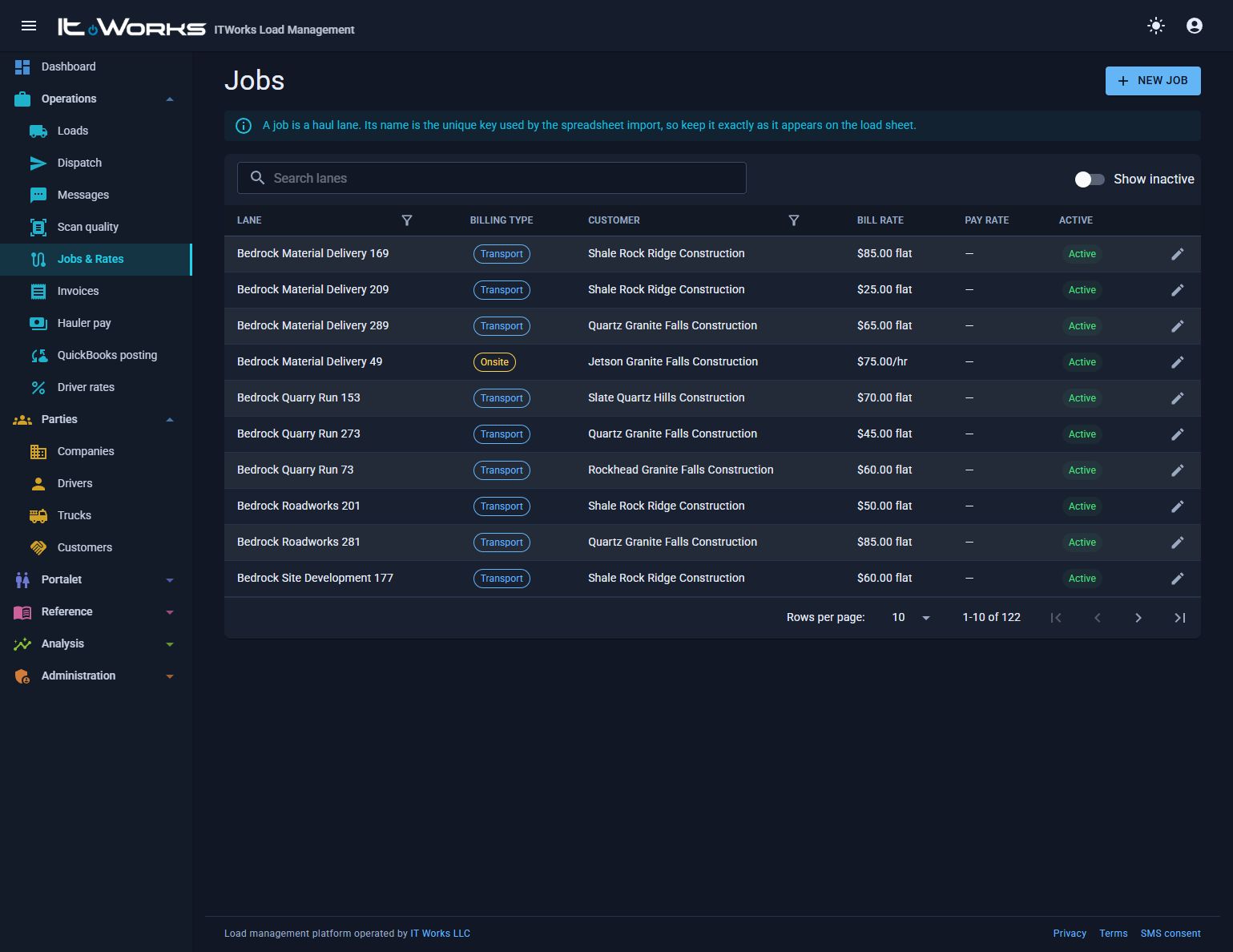
01 / Set up the lane
STEP 01 OF 07
Start with the right lane and rate.
Connect a job to its customer, route and billing setup. Effective-dated rates let your pricing change as the business changes.
Maintain jobs, customers and locations
Use named driver-rate schemes
Keep historical pricing on the load
Actual app screens using the isolated demo database. Names and amounts are synthetic. Screens illustrate the workflow, not a single transaction.
THE TOOLS BEHIND THE WORK
Run the day. Keep the details.
From the first assignment to the final report, the essential work stays connected.
01 / OPERATIONS
Loads & dispatch
Plan drivers by job or driver, assign trucks, and send daily job lists by text. Track loads through configurable statuses and keep multiple records open in split-panel editors.
Customer, lane, hauler and status filters
Quick add and standing driver assignments
Review queues and delivery follow-up
02 / PRICING
Rates you can explain
Keep the bill side and pay side together. Apply effective-dated lane rates and driver percentage schemes, with trailer and workers-comp inputs recorded alongside the calculation.
Flat, per-ton, hourly and mileage pricing
Company and driver rate overrides
Historical amounts preserved on each load
03 / PAPERWORK
Tickets, not loose ends
Attach delivery tickets, bills of lading and yard tickets to the load. Document reading can extract ticket numbers and weights, with confidence checks that flag uncertain results.
Live camera scanning, photos and PDFs
Per-driver scanner selection and document cropping
Duplicate-ticket and review workflows
Document reading and storage require configured services.04 / SETTLEMENT
Turn completed work into billing
Select finalized loads for customer invoices and hauler payments. Keep fees, printable documents and export status connected to the loads behind each total.
Customer invoices and supporting riders
Hauler payment records and printouts
QuickBooks Desktop IIF or automatic posting
Automatic posting requires the companion Windows QuickBooks agent. Track results and retry failed items from the office queue.05 / PEOPLE
Give everyone their own view
Drivers can access their loads, upload paperwork and report issues through a dedicated portal. Hauling companies have their own loads, drivers, dispatch and messages.
Driver sign-in by SMS code or link
Company-scoped portal access
Office permissions control money visibility
06 / VISIBILITY
Know where the margin goes
Review what lanes, customers, haulers, drivers and materials earn. Compare results over time and see the work still waiting to be billed or paid.
Keep inbound replies, outbound SMS and email, delivery results and linked loads in a searchable message history.
Better scans. Clearer usage.
Review scan quality by driver, including unreadable photos, framing and office corrections. Monthly usage reports break down loads and documents with an export for review.
A traceable record
Audit stamps record who changed a record. Role-based access and separate driver/company scopes limit what each user can see and do.
LOOK INSIDE
The real workspace.
Click a screen to explore it at full size. Synthetic customer, company and driver data.
⌖
PORTABLE-TOILET OPERATIONS, TOO
Keep track of every unit. And every stay.
The Portalet area manages a separate customer base, units and service sites. Follow placements, moves, pickups and cleanings, with site boundaries and a map view.
Unit inventoryPlacement historyService trackingSites & map
A FEW GOOD QUESTIONS
Before you take the next step.
Who is ITWorks Load Management for?
Hauling and trucking contractors that coordinate loads, drivers, outside hauling companies, customer billing and hauler settlement. The Portalet area supports portable-toilet tracking alongside hauling operations.
Will changing a rate change an old load?
Pricing and its inputs are stored on the load. Changing a rate card does not automatically rewrite the historical amounts already recorded.
Can drivers see billing and margins?
The dedicated driver portal does not expose money. Company users have a separate scoped view, while office permissions govern access to billing, pay and margin information.
How does QuickBooks work?
Choose IIF files for manual import or automatic QuickBooks Desktop posting through the companion Windows agent. The posting queue shows results and lets the office retry failures.
What needs to be configured?
SMS, email, document storage, document reading and mapping use external services that need configuration. Licensing, deployment, data migration and service costs can be reviewed with ITWorks for your operation.
LET’S PUT YOUR OPERATION IN THE PICTURE
Less spreadsheet. More forward.
Explore how ITWorks Load Management could fit your lanes, your people and the way you get paid.